Most WordPress publishers know their total commission but not which post earned it. Here is how to fix that: cloaked links, sub-IDs, GA4 events and the reconciliation check that catches broken tracking.
Sep 6, 2026 · 9 min read
Most WordPress publishers can tell you what they earned last month. Far fewer can tell you which post earned it — or which button, in which paragraph, on which page. That gap is not a reporting problem; it is a tracking problem, and it is the single biggest reason affiliate income plateaus. You cannot double down on what you cannot see.
This guide is for bloggers, reviewers and niche-site owners running affiliate links on WordPress who want a setup that actually answers "what is working?". We will cover link cloaking, sub-IDs, GA4 event tracking and server-side postbacks — what each one does, the order to add them in, and the one same-domain trap that silently breaks click tracking for almost everybody. (For the underlying mechanism, see How Does Affiliate Tracking Work?.)
The two questions tracking has to answer
Affiliate tracking on WordPress is really two separate systems that most people never connect:
01Their side. Did the network record the click, attribute the sale and credit me? This lives in the affiliate dashboard, and you do not control it.
02Your side. Which page, which section and which button produced that click? This lives on your site, and the network knows nothing about it.
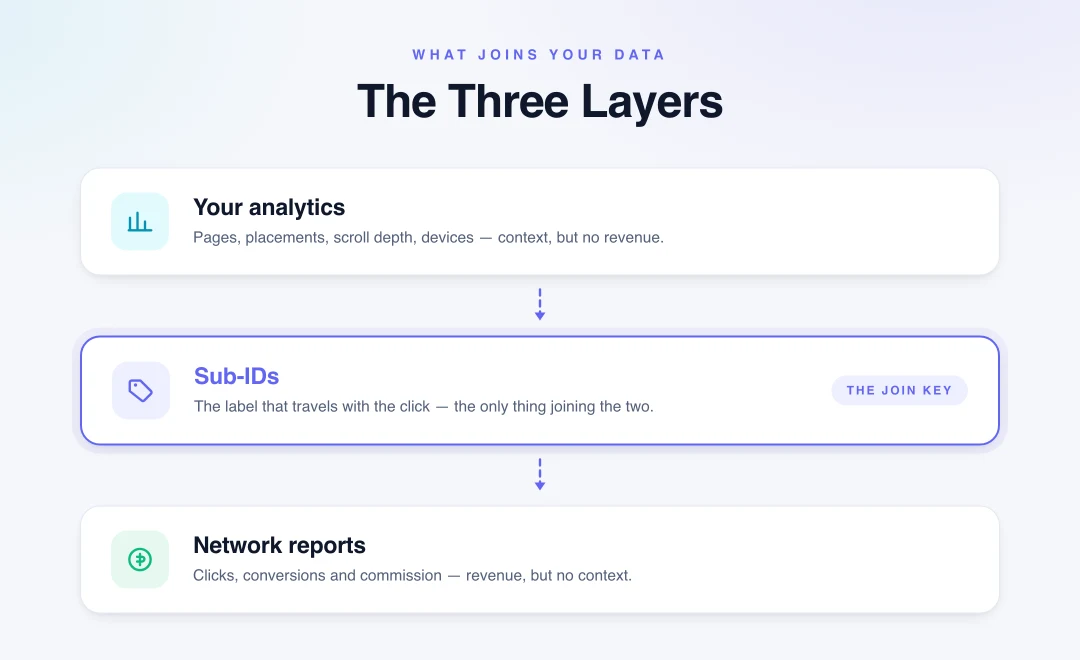
A working setup joins the two. The join key is the sub-ID — a small label you attach to every outbound link that travels with the click and shows up in the network's report. Without it, the network tells you a sale happened but not where it came from, and your analytics tell you a link was clicked but not whether it earned anything.
How a tracked link actually works
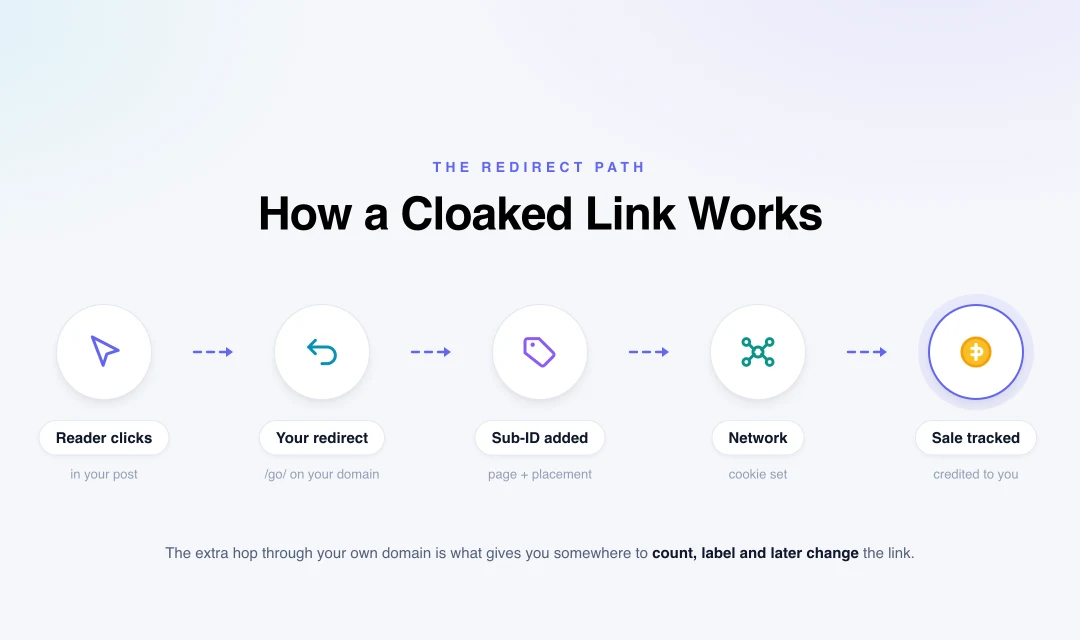
Cloaking routes the click through your own domain first, which is what gives you a place to count it and label it.
A raw affiliate link points straight at the network. A cloaked link points at your own site first:
That extra hop is the whole point. Because the click passes through your server, you get somewhere to count it, label it and change it later — without editing a single post. Swap programs a year from now and you update one redirect instead of forty articles.
On the redirect type: a 302 (temporary) is the better default for affiliate links, because the destination genuinely is temporary and you do not want search engines treating your /go/ URL as permanently moved. Most plugins let you choose; several default to 301, which works but is less semantically correct.
The three layers
Sub-IDs are the middle layer — the only thing that lets your on-site data and the network's revenue data describe the same click.
Network reports tell you clicks, conversions and commission — the money, with no context.
Your analytics tell you pages, scroll depth, devices and behaviour — the context, with no money.
Sub-IDs are the layer that makes the other two describe the same click.
Get the middle layer right and the other two become far more valuable. Skip it and you are guessing.
Method 1 — Link cloaking with a plugin
A cloaking plugin creates the /go/ redirect layer inside WordPress. The established options are Pretty Links, ThirstyAffiliates and Lasso, with AAWP popular specifically for Amazon-style product boxes.
What you get:
One tidy internal URL per program, reusable across every post
Click counts on your side, independent of the network
The ability to swap a destination globally when a program changes
Automatic rel attributes and link categorisation
Two caveats worth knowing before you commit. First, some programs restrict cloaking or redirecting — Amazon Associates is the most frequently cited example, and its terms are strict about how links may be used. Check the program terms before you route their links through your domain. Second, once you publish a slug, never change it; every old post pointing at /go/hosting will break silently.
Method 2 — Sub-IDs, the highest-return habit
If you do only one thing from this guide, do this. A sub-ID is a parameter you append to the destination URL that the network stores against the click and reports back on the sale.
The parameter name differs by platform, which is exactly why people skip it:
Platform
Commonly used parameter
ShareASale
afftrack
CJ Affiliate
sid
Awin
clickref
Impact
subId1 (plus subId2, subId3)
Most in-house programs
subid, sid or aff_sub
Verify the exact name in your own dashboard before relying on it — an unrecognised parameter is silently ignored, and you will not find out until you go looking for data that was never recorded.
Structure the value so it is readable months later. A simple, durable convention:
Keep it short, use only letters, numbers and hyphens, and never put personal data in a sub-ID — it travels to a third party and is stored in their reporting.
Method 3 — GA4 events, and the trap almost everyone hits
Here is the part that catches most WordPress publishers out. GA4's Enhanced Measurement includes an outbound click event — but it only fires when a link points to a different domain. A cloaked link points at yoursite.com/go/..., which is your own domain, so GA4 records nothing.
People install a cloaking plugin, assume GA4 is covering clicks, and quietly collect no data for months.
Two ways to fix it:
Google Tag Manager — add a Click trigger matching links whose URL contains /go/, and fire a custom affiliate_click event with the destination and page as parameters.
Plugin-fired events — several cloaking plugins can push a dataLayer event or send a GA4 event on click. Enable it, then confirm in GA4's DebugView that the event actually arrives.
Either way, send useful parameters: the link slug, the page it was clicked from, and the placement. That is what turns "142 clicks" into "the comparison table outperforms the intro CTA four to one."
Method 4 — Server-side tracking
Browser-based tracking loses data to ad blockers, privacy settings and short cookie lifetimes. If you run paid traffic, high volume, or a program that supports it, server-side and postback tracking are far more resilient — the conversion is reported machine-to-machine rather than depending on the visitor's browser. It is more setup than most bloggers need on day one, but it is the right destination as you scale. Read pixel vs postback tracking and what server-side tracking is before choosing.
Method
Answers
Effort
Worth it when
Cloaking plugin
How many clicks, and manageable links
Low
Always
Sub-IDs
Which page and placement earned
Low
Always — start here
GA4 events
On-site behaviour around the click
Medium
You want to optimise placement
Server-side / postback
Conversions that survive blockers
High
Paid traffic or real scale
Step-by-step: a setup that works
01Install one cloaking plugin and set the base slug — /go/ or /recommends/.
02Create one cloaked link per program, with rel="sponsored nofollow" and a 302 redirect.
03Append a sub-ID encoding page and placement, using the parameter name your network expects.
04Exclude the redirect path from caching. Page-cache plugins and CDNs can cache or mangle a redirect; add /go/* to the cache exclusion list.
05Add a GA4 event for clicks on /go/ links, and confirm it in DebugView.
06Reconcile the counts. Compare your plugin's click count against the network's for the same week. A persistent gap means clicks are being lost between your redirect and their server.
07Review monthly by sub-ID and act: improve the placements that convert, remove or rewrite the ones that do not.
Where to start
Tracking only pays off on programs worth tracking. These are the staples of the WordPress ecosystem — all in our directory, all supporting deep linking so you can send readers to the exact page you are writing about rather than a generic homepage:
Deep linking matters more than most publishers realise: sending someone from a review of one specific plan to that plan's page, with a sub-ID attached, is the difference between a measurable funnel and a guess. Compare terms across the full directory, and judge offers on EPC rather than headline rate.
Common mistakes
Trusting GA4 outbound clicks for cloaked links. They are same-domain; the event never fires.
Using one sub-ID everywhere — or none. Then the network's report tells you nothing you can act on.
Forgetting `rel="sponsored"`. It is Google's stated expectation for paid and affiliate links.
Letting the cache eat the redirect. Excluding the redirect path is a two-minute fix that prevents a baffling outage.
Cloaking where the terms forbid it. Check before routing a program's links through your domain.
Renaming a slug after publishing. Every historical link breaks, silently, forever.
Never reconciling click counts. The gap between your redirects and their clicks is the clearest early warning that tracking is broken.
Affground's verdict
Almost every WordPress affiliate setup is missing the same thing, and it is not a plugin — it is the sub-ID. Cloaking gives you tidy, swappable links; GA4 gives you on-site context; server-side gives you resilience. But the sub-ID is what makes the network's revenue data and your page data describe the same click, and it takes about ten minutes to adopt. Add it first, reconcile your click counts once a month, and you will finally know which post is paying for the site.
Frequently asked questions
Do I need a plugin to track affiliate links in WordPress?
Not strictly, but it is by far the easiest route. A cloaking plugin such as Pretty Links, ThirstyAffiliates or Lasso creates the redirect layer, counts clicks on your side and lets you change a destination globally without editing old posts. You can build the same thing with manual redirects, but you lose the reporting.
What is link cloaking and is it allowed?
Cloaking routes an affiliate link through your own domain — yoursite.com/go/hosting — which then redirects to the network. It is widely used and generally fine, but some programs restrict it. Amazon Associates is the most commonly cited example, so always check the program terms before cloaking their links.
Should affiliate links be nofollow or sponsored?
Use rel="sponsored", which is Google's stated attribute for paid and affiliate links. Many publishers use rel="sponsored nofollow" together, which is also acceptable. The important thing is that affiliate links are not passed as ordinary editorial links.
Why don't my affiliate clicks show up in Google Analytics?
Because cloaked links point at your own domain. GA4's Enhanced Measurement only fires an outbound click event when the link goes to a different domain, so a /go/ link registers nothing. Fix it with a Google Tag Manager click trigger matching /go/, or by enabling your plugin's GA4 event, then confirm it in DebugView.
What is a sub-ID and how should I name them?
A sub-ID is a parameter appended to the affiliate URL that the network stores against the click and reports on the sale, letting you see which page produced revenue. Use a readable convention like postslug-placement (for example best-hosting-comparison-table), keep it to letters, numbers and hyphens, and never include personal data.
Should affiliate redirects be 301 or 302?
A 302 temporary redirect is the better default, because the destination genuinely can change and you do not want search engines treating the /go/ URL as permanently moved. A 301 still works, and several plugins default to it, but 302 is more semantically correct for affiliate links.
How do I know if my affiliate tracking is broken?
Reconcile click counts: compare the clicks your cloaking plugin recorded against the clicks the network recorded for the same period. A persistent gap means clicks are being lost between your redirect and their server. Also click your own link in a fresh incognito window and confirm it appears in the affiliate dashboard.