Impact.com vs PartnerStack: Which Partner Platform Fits?
Impact.com is a brand-and-retail partnership marketplace; PartnerStack is a B2B SaaS partner ecosystem. We compare catalog, approval, contracts, cookies and payouts from each platform's official docs.
Nov 25, 2026 · 8 min read
Impact.com and PartnerStack both call themselves partnership platforms, and both will pay you for referrals. They are built for different worlds. Impact.com runs a broad brand-and-retail marketplace of thousands of advertisers, with a product catalog its partner page puts at 600M+ items. PartnerStack runs a B2B SaaS partner ecosystem: several hundred software companies, recurring revenue-share offers and programs for resellers as well as affiliates.
This comparison is for publishers, creators, agencies and consultants deciding where to put their applications. We compare what each platform actually controls (catalog, approval, contracts, cookies and payouts) and what it leaves to each brand. Every figure comes from the impact.com and PartnerStack help centers and partner pages, checked in November 2026.
Two different marketplaces
Impact.com sells partnership management software to brands. The partner side is a marketplace where you apply to brands one at a time. Retail, travel, finance and consumer subscriptions sit side by side, and partners range from publishers and coupon sites to creators, cashback platforms and mobile apps. The impact.com partner page pitches commerce content, sponsored content and a Product Marketplace where you can compare offers on individual products and apply to the brand from the product page.
PartnerStack describes itself as a partner relationship management (PRM) platform for B2B software. Its marketplace lists companies selling productivity, analytics, CRM, marketing and other business tools, and you can browse by ecosystem (HubSpot, Salesforce or Shopify apps). The help center says the Marketplace has over 400 companies, while PartnerStack's partner page cites 600+ B2B brands. Programs accept referrals in three ways: link-based attribution, deal registration for resellers, and lead forms for client introductions.
The practical difference is the buyer. On Impact.com you usually send a consumer to a checkout. On PartnerStack you send a business to a trial, demo or subscription, often paid for months.
Both platforms make you clear two gates: the platform first, then each brand.
Impact.com asks you to create a partner account, categorise your business, connect and verify at least one promotional channel and complete your public profile. That submits a marketplace application, which impact.com reviews for authenticity and compliance, with a decision within 72 hours. The help center gives four common reasons for a decline: incomplete information, media properties that can't be verified, limited reach or activity, and flags under its Master Program Agreement. Once approved, your profile is visible to brands and you can apply to programs through Discover → Brands.
PartnerStack asks for 8–10 pieces of information: business name, website, LinkedIn profile, location, a short business description and six to eight questions about how you sell, including audience size and preferred commission structure. The Network team reviews most applications within 5 business days. You can fill in program applications while you wait. They are held and submitted automatically if the Network approves you. A business-domain email helps, and a website that doesn't show how you will drive customers can get you rejected.
Impact.com checks for real media with real reach. PartnerStack checks for a legitimate business that B2B buyers will trust.
Contracts and cookies
This is where the two differ most.
On Impact.com, every partnership runs on a contract. When you apply to a brand, or accept a brand's invitation, you review a contract that sets the payout (a fixed amount or a percentage), payout groups and limits, the credit policy, the referral window, the action-locking period and the payout schedule. All contracts also require you to accept the Impact Master Campaign Agreement. The referral window is set per contract, so two brands, or even two partners of the same brand, can have different windows. Once you can show volume, you can propose new contract terms to a brand.
On PartnerStack, each company sets its own offer: revenue share, CPL, CPA or CPC. Approved partners must accept that program's Terms of Service before the dashboard unlocks. Tracking is more standardised. PartnerStack's referral links use first-party cookies that last 90 days, and the clock restarts if the customer clicks the link again. The referral has to sign up or buy on the same browser and device. Programs can also release commissions in instalments or after a delay to cover trials and cancellations.
There is no single "Impact.com cookie length"; the window that matters is the one in your contract. On PartnerStack the 90-day window is consistent, but offers and approval rules vary by program. For how flat fees and recurring shares compare, see CPA vs revenue share vs hybrid.
Getting paid
Step
Impact.com
PartnerStack
Who approves earnings
The brand, during the action-locking period in your contract
The company, which reviews last month's commissions in the first week
When money reaches your balance
When the brand pays after locking, per its contract
Typically around the 13th of the following month; some programs pay between the 8th and 13th
How it leaves
Autopay at a balance threshold (from $10) or on the 1st or 15th
You click "Withdraw funds"; full balance only
Speed after release
ACH/wire 3–5 business days; PayPal immediately after the paystub clears
Stripe and direct deposit 2–5 business days; PayPal 6–10
Extras and penalties
Anytime PayPal (beta) for balances under $500: $2 + 2%, capped at $20. A maintenance fee applies from month 7 if you can't be paid for 6 months
An 8.33% monthly late fee on commissions unclaimed after 2 years
Impact.com works in two steps. Brands pay locked actions into your impact.com balance according to their contracts. Your Autopay settings then decide when the balance is withdrawn. Threshold payouts are processed on the following Tuesday or Thursday. Fixed-day payouts trigger on the 1st or 15th, as long as your balance is above $10. Impact.com warns against fixed-day payouts if you work with several brands, because a late-funding brand pushes your money to the next month.
PartnerStack runs on a single monthly cycle. You earn from the 1st to the last day of the month. Companies review commissions in the first week of the next month, and approved, paid commissions become available around the 13th. You then withdraw everything at once, with tax information on file. It is predictable, but a March commission is not available until mid-April at the earliest.
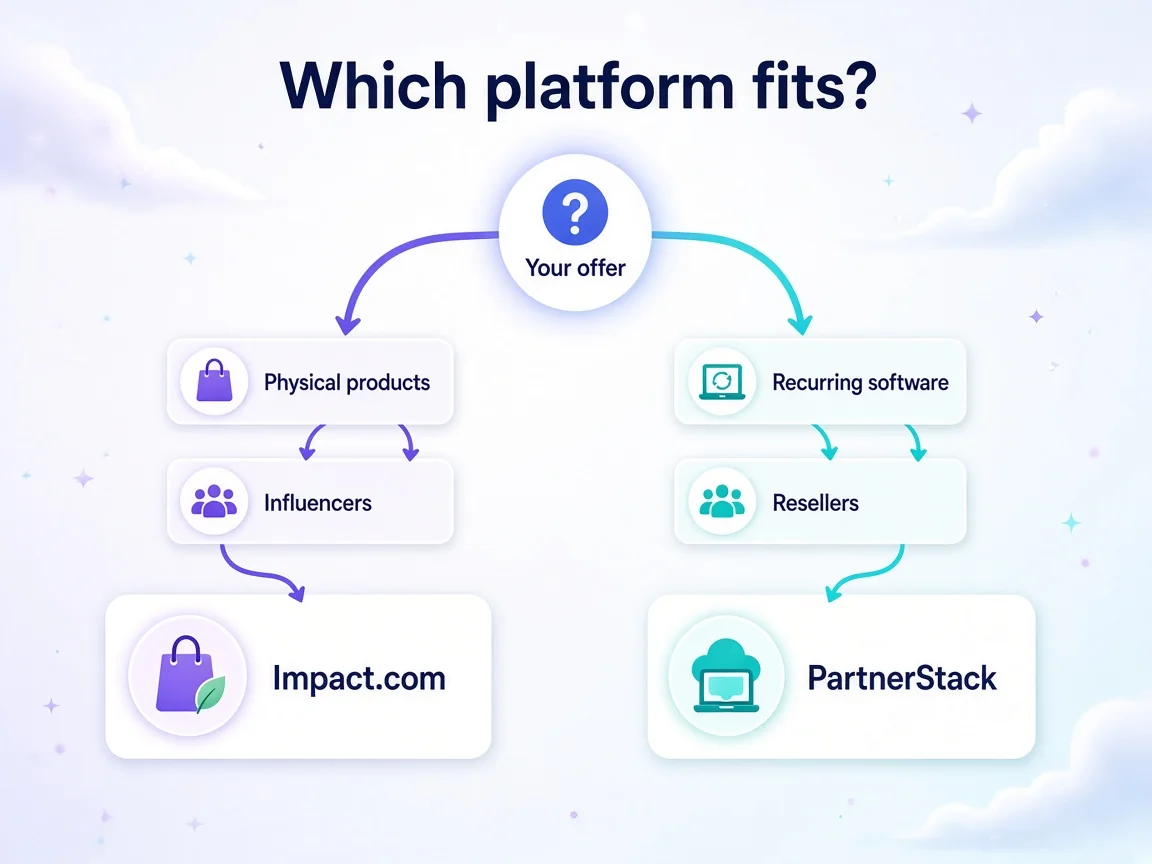
Which platform fits?
Choose by who your audience buys from: consumer brands point to Impact.com, software buyers point to PartnerStack
Start with your audience's buying behaviour, not the size of the platform.
Physical products, travel and consumer subscriptions. Impact.com. That is where these brands are, and the Product Marketplace lets you compare offers at the item level.
Creators and influencers. Impact.com, for its creator tooling and sponsored-content options alongside commission deals.
Recurring software. PartnerStack. Revenue-share offers on subscriptions build income month after month, and the 90-day window suits longer B2B buying cycles.
Resellers, agencies and consultants. PartnerStack. Deal registration and lead forms reward you for introducing clients, not just for clicks.
Many publishers end up on both. A tech review site might use Impact.com for consumer gadgets and PartnerStack for the SaaS tools it reviews. For more on each platform's workflow, see our guides to using Impact.com and using PartnerStack. For a retail-network comparison, read Impact.com vs CJ Affiliate.
Mistakes to avoid
Assuming one cookie length on Impact.com. Read the referral window and credit policy in each contract.
Choosing fixed-day Autopay while working with many brands. A late-funding brand can push your payout back a month.
Applying to PartnerStack with a free email address, a thin website or a LinkedIn profile that doesn't match.
Leaving PartnerStack commissions unclaimed. Late fees start at two years.
Ignoring withdrawal fees. PayPal costs 2% (up to $20) on both platforms, so small, frequent withdrawals cost more.
Affground's verdict
Choose Impact.com if your audience buys from consumer brands, and treat each contract as the real source of your terms. Choose PartnerStack if your audience buys software for work, where a 90-day cookie, recurring revenue share and reseller programs fit how B2B deals close. If you cover both, run both. To compare other options, browse the affiliate networks directory.
Frequently asked questions
What is the difference between Impact.com and PartnerStack?
Impact.com is a partnership marketplace of thousands of brands, mostly consumer, retail, travel, finance and subscription companies. PartnerStack is a partner platform for B2B software companies, with affiliate, referral, reseller and influencer programs. Pick the one whose brands your audience actually buys from.
What is the minimum payout on Impact.com?
$10 USD, or the equivalent in your account currency. You can set Autopay to pay out when your balance reaches a threshold of $10 or more, or on the 1st or 15th of the month as long as your balance is above $10.
What is the minimum payout on PartnerStack?
You need at least $5 USD in available commissions after fees to withdraw. All available commissions are withdrawn together in one transaction.
When does PartnerStack pay partners?
Commissions earned in a month are sent to companies for review at month end. Approved and paid commissions typically become available to withdraw around the 13th of the following month, and some programs pay between the 8th and 13th. Withdrawals then take 2–5 business days by Stripe or direct deposit, or 6–10 business days by PayPal.
How long is the cookie on Impact.com and PartnerStack?
On Impact.com, the referral window is set in each brand–partner contract, so it varies by brand. PartnerStack referral links use first-party cookies that last 90 days from the click, and the clock restarts if the customer clicks again.
What fees do partners pay on Impact.com and PartnerStack?
On Impact.com, domestic EFT/ACH payouts are free, international wires carry a currency-specific fee, and PayPal costs 2% up to $20. On PartnerStack, Stripe costs $2.25 plus 0.25% up to $20, PayPal costs 2% up to $20, and direct deposit fees vary by country.
How do I get approved on Impact.com and PartnerStack?
Impact.com reviews your marketplace application, including verified channels and a complete profile, within 72 hours. PartnerStack reviews Network applications, usually within five business days. On both platforms, each brand then approves or declines you individually.
Can I use both Impact.com and PartnerStack?
Yes. Many publishers use Impact.com for consumer brands and PartnerStack for the B2B software they cover. Each platform has its own application, terms and payout setup.